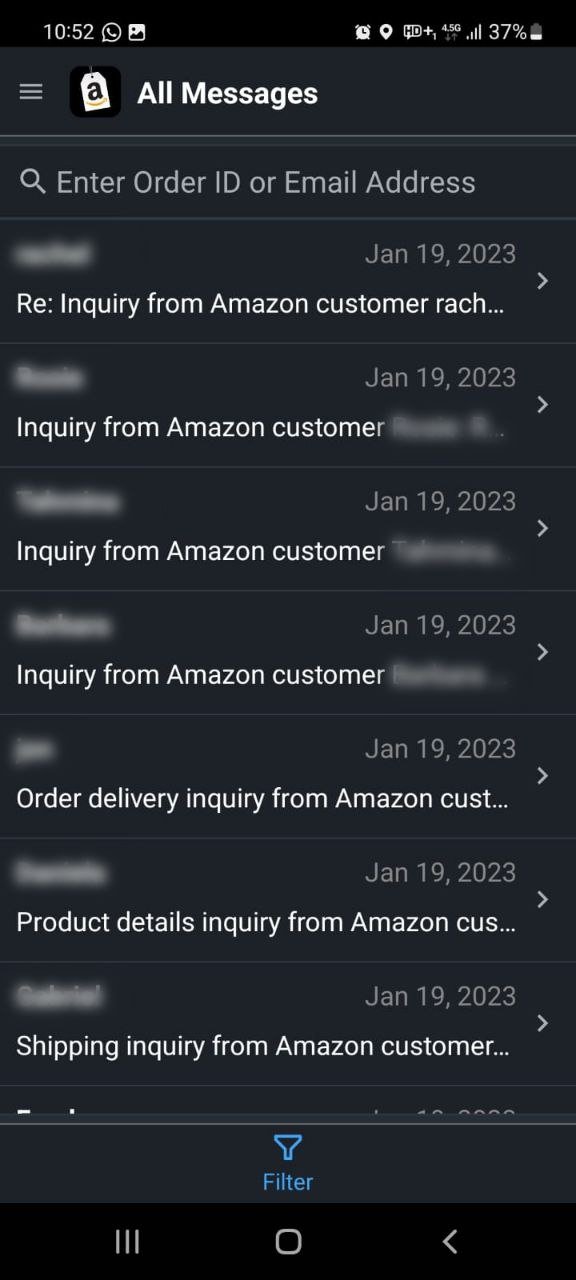
When you’re selling on Amazon, direct communication with your customers is often the bridge between a good transaction and a great one. While Amazon handles much of the automated communication, the dedicated channel for personal, order-specific interactions is the Amazon Buyer Message Center. Mastering this tool isn't just about answering questions; it's about building trust, resolving issues efficiently, and ultimately, delivering better service that reflects positively on your business.
At a Glance: Your Amazon Buyer Message Center Essentials
- What it is: A direct communication channel for sellers and buyers to discuss order-related issues.
- Privacy Protected: Uses anonymized email addresses to keep personal contact details secure for both parties.
- How to Enable: Go to "Settings" > "Notification preferences" > "Messaging" > "Edit" > "Buyer messages."
- Where to Access:
- Desktop: Seller Central (envelope icon > "Messages").
- Mobile App: Amazon App (menu icon > "Account" > "Message Center").
- Email: Directly via your registered email address.
- Strict Guidelines: Only essential, order-specific messages are permitted; promotional content, thank-you notes, and review requests are prohibited.
- Response Time: Amazon emphasizes prompt communication, ideally within 24 hours.
- Permanent Record: All communications are stored and cannot be deleted by sellers.
Why the Amazon Buyer Message Center Matters to Your Business
Think of the Amazon Buyer Message Center as your dedicated customer service desk within the Amazon ecosystem. It's not just a feature; it's a critical component of your seller performance. This direct chat system, often referred to as the Buyer-Seller Messaging Service, allows you to engage with customers about everything from feedback and returns to specific product requests and shipping updates.
Amazon’s system creates two anonymized email addresses for each interaction, shielding both your and your buyer's private contact details and preventing transactions from moving off-platform. This security measure is crucial for maintaining a trusted marketplace. By actively and correctly using your Amazon Message Center, you're not just adhering to Amazon's rules; you're actively contributing to customer satisfaction, improving your seller metrics, and fostering long-term loyalty. It's where potential problems transform into opportunities to impress.
Enabling Your Messaging Center: Don't Miss a Beat
Before you can start dazzling customers with your responsive service, you need to ensure your messaging center is properly set up to receive communications. It’s a simple process, but one that’s easy to overlook.
Here’s how to activate buyer-seller messages:
- Log in to Seller Central: Head over to your Seller Central dashboard.
- Navigate to Settings: In the top right corner, hover over "Settings."
- Click "Notification Preferences": This will take you to a page where you manage various alerts.
- Find the "Messaging" Header: Look for the section specifically labeled "Messaging."
- Click "Edit": You'll see an "Edit" button next to the Messaging header. Click it.
- Check "Buyer messages" and Enter Email: Ensure the box next to "Buyer messages" is checked. Then, enter the preferred email address where you want to receive these messages. This should be an email you check frequently.
- Click "Save": Don't forget this final step to apply your changes.
Once active, messages will flow directly to your registered email address, as well as appear within the messaging center itself. This dual notification system means you have multiple ways to stay on top of customer inquiries. Remember, while buyers can opt-out of non-essential communications, critical order-related messages will still reach them, highlighting the importance of using this channel responsibly.
How to Access and Navigate Your Messages
Timely communication is a cornerstone of excellent customer service. Knowing exactly how and where to access your buyer messages is the first step in ensuring you never miss a critical inquiry.
On Desktop (Seller Central)
This is likely your primary hub for managing your Amazon business, including customer messages:
- Log in to Seller Central: Go to sellercentral.amazon.com.
- Look for the Envelope Icon: In the top navigation bar, typically near your business name or other quick links, you’ll see an envelope icon. This is your notifications hub.
- Click the Envelope Icon: A dropdown menu will appear.
- Select "Messages": This will take you directly to your messaging center.
On Mobile (Amazon App)
For sellers on the go, the Amazon app offers convenient access:
- Open the Amazon App: Launch the app on your smartphone or tablet.
- Tap the Menu Icon: Look for the three horizontal lines (often in the bottom right or top left, depending on your device and app version).
- Select "Account": Scroll through the menu until you find "Account."
- Scroll Down to "Message Center": Under your account settings, you’ll find "Message Center." Tap on it to view your communications.
Email Access: Your Always-On Backup
The email address you registered during the setup process is your direct line to buyer messages. Every message sent through the Buyer-Seller Messaging Service will also land in your inbox. This makes your email a critical tool for monitoring, especially if you're not constantly logged into Seller Central or the Amazon app.
Navigating the Messaging Center Interface
Once inside the Amazon Buyer Message Center, you'll find it designed for efficiency:
- Two Primary Tabs: Typically, you'll see a tab for "General Messages" (which might include Amazon announcements or other non-buyer-specific communications) and a dedicated tab for "Buyer/Seller Messages." Focus on the latter for customer interactions.
- Filtering Options: To quickly sort through your correspondence, utilize the available filters. You can organize messages by:
- Unread: To quickly identify new inquiries.
- Sent/Received: To review outgoing or incoming communications.
- Need a Response: A crucial filter to prioritize pending replies.
- Company Buyers: If you deal with business customers.
- Date Ranges: To look up older conversations or track communication trends.
A Crucial Note on Message Retention: Unlike some chat systems, the Amazon Buyer Message Center does not allow sellers to delete individual messages or entire threads. All communications are permanently stored within the system. This underscores the importance of maintaining professional, compliant, and accurate exchanges at all times, as they form a permanent record of your interactions.
Mastering Amazon's Messaging Guidelines: What You CAN & CAN'T Send
Amazon's messaging guidelines are strict, designed to protect buyers from spam and ensure a consistent, reliable shopping experience. Adhering to these rules is non-negotiable for maintaining good account health.
Permitted Messages: Essential & Order-Focused
The golden rule for the Buyer Message Center is "necessity." Messages must be directly related to completing an order or responding to a legitimate customer service inquiry.
Here are examples of what you can send:
- Shipping Delays: Proactively inform buyers about unexpected delays.
- Out-of-Stock Issues: Communicate immediately if an item becomes unavailable after purchase.
- Return Questions: Respond to inquiries about returns or provide necessary instructions.
- Invoice Requests: Provide invoices if a buyer specifically requests one.
- Custom Product Questions: If the order involves customization (e.g., engraving, specific colors), ask clarifying questions needed to fulfill the order.
- Delivery Scheduling: Coordinate a delivery time for large or specialized items.
- Shipping Address Problems: If there's an issue with the provided shipping address that prevents delivery.
These communications ensure the order proceeds smoothly and address specific concerns a buyer might have.Managing customer queries effectively through your Amazon Message Centeris paramount, and these are the types of messages that truly add value.
Critical Messages: When Urgent Action is Needed
Sometimes, an order simply cannot move forward without buyer input. For these situations, Amazon allows you to send "critical" messages, which bypass buyers' non-essential communication opt-out preferences.
To send a critical message:
- Include
[Important]in the Subject Line: You must put[Important](brackets included) anywhere in the subject line of your message. - Use it Sparingly: Only use this for genuinely essential communications where the order cannot proceed otherwise. Misuse can lead to penalties.
Examples of critical requests: - Confirmation needed for custom product details.
- A required delivery appointment time.
- Verification of an invalid or incomplete shipping address.
Prohibited Messages: Avoiding Common Pitfalls
Just as important as knowing what to send is understanding what not to send. Sending prohibited messages can result in warnings, account suspensions, or even removal from Amazon.
Steer clear of these:
- Shipping or Order Confirmation Messages: Amazon automatically sends these. Your message is redundant and considered spam.
- Thank You Messages: While well-intentioned, these are considered non-essential and prohibited. Focus on resolving issues, not just saying thanks.
- Promotional or Marketing Content: This includes coupons, upsells, discounts, or any attempt to drive future sales.
- Requests for Positive Reviews or Feedback: You cannot directly ask for positive reviews, nor can you ask buyers to remove or change a review. Only neutral review requests using Amazon-approved tools are allowed (e.g., "Request a Review" button in Seller Central).
Prohibited Content in Messages: The No-Go Zone
Beyond message types, specific content elements are also forbidden:
- External Links: Unless they are secure HTTPS links absolutely essential for order completion (e.g., a specific shipping carrier's tracking page) or links to Amazon itself.
- Attachments: Only if absolutely necessary to resolve an issue (e.g., an invoice or a troubleshooting guide for a complex product).
- Logos that Link Off Amazon: Any branding that attempts to redirect buyers away from the platform.
- Sensitive Content Images: Violence, gore, adult language, or anything inappropriate.
- Tracking Pixels: Used to monitor email opens or clicks.
- Contact Information: This includes email addresses, phone numbers, or physical addresses, unless specifically required for warranties, shipping providers, or manufacturers, and only if it’s critical for order fulfillment.
- Most Images: Generic product images, unrelated pictures, branding images, off-brand styling, stock photos, or memes are generally forbidden.
- Emojis, GIFs: Keep communication professional and text-based.
- Links Allowing Buyers to Opt-Out: Buyers manage their communication preferences through Amazon directly; you cannot provide your own opt-out links.
These rules are in place to ensure a consistent, safe, and spam-free environment for Amazon buyers. Deviating from them puts your account at risk.
Best Practices for Stellar Customer Communication
Now that you know the rules, let's talk strategy. Effective communication via your Amazon Message Center is a powerful tool for building a reputable Amazon business.
Respond Promptly (Aim for 24 Hours)
Amazon places a significant emphasis on response time. Ideally, you should aim to reply to all buyer messages within 24 hours, including weekends and holidays. This metric directly impacts your seller performance and can influence buyer satisfaction and even your eligibility for certain programs (like the Buy Box). Fast responses show professionalism and reduce buyer anxiety. Make checking your Amazon Message Center regularly a non-negotiable part of your daily routine.
Professionalism is Key
Your tone, clarity, and empathy in messages reflect directly on your brand.
- Clear and Concise: Get straight to the point. Avoid jargon or overly technical language.
- Polite and Respectful: Even when dealing with frustrated customers, maintain a calm and courteous tone.
- Address Concerns Directly: Read the buyer’s message carefully and answer all their questions. If you need more information, ask specific, easy-to-understand questions.
- Proofread: Typos and grammatical errors can undermine your professionalism. Always double-check your messages before sending.
Leverage Amazon's Message Templates
To ensure compliance, consistency, and efficiency, Amazon encourages sellers to use its pre-approved message templates. These templates often include placeholders for required elements like the buyer’s preferred language and the 17-digit order ID, making it easier to construct compliant messages quickly.
- Benefits:
- Compliance: Ensures you don't inadvertently include prohibited content or requests.
- Consistency: Provides a uniform brand voice for all customer interactions.
- Efficiency: Speeds up response times, especially for common inquiries.
Familiarize yourself with these templates in Seller Central and integrate them into your workflow where appropriate.
Keep It On-Platform
This cannot be stressed enough: all buyer interactions must remain within the Amazon messaging system. Attempting to communicate off-platform (e.g., asking for a direct email or phone number not for approved purposes) violates Amazon's terms of service. This rule protects both buyers from potential scams and sellers by providing an official record of all communications, which can be crucial in dispute resolution.
Review Feedback & Adapt
Beyond individual messages, pay attention to the broader feedback you receive. Customer messages often highlight common pain points, product flaws, or areas where your service could improve.
- Identify Patterns: Are multiple customers asking the same question? That might indicate unclear product listings or instructions.
- Product Improvement: Feedback can be a goldmine for refining your products or updating their descriptions.
- Build Social Proof: Addressing concerns in messages and then making visible improvements based on that feedback can enhance your reputation and build social proof.
Scaling Your Customer Service (Consider Outsourcing)
As your sales volume grows, so too will the number of buyer messages. If you find yourself overwhelmed, consider outsourcing customer service. Platforms like UpWork or Freelancer.com offer access to virtual assistants or specialized customer service representatives who can manage your Amazon Message Center according to your guidelines. This can prevent burnout, maintain response times, and allow you to focus on other aspects of your business.
Common Questions & Misconceptions About Amazon Messaging
Let's clear up some frequent queries that often arise when sellers navigate the Amazon Buyer Message Center.
Q: Can I delete messages from the Amazon Buyer Message Center?
A: No, you cannot. Amazon does not allow sellers to delete individual messages or entire conversation threads. All communications are permanently stored as a record for both parties and for Amazon's review if needed. This is why maintaining professional and compliant messages is so important.
Q: Can I ask a buyer to leave a positive review or change a negative one?
A: Absolutely not. This is a strict violation of Amazon's policies. You cannot directly solicit positive reviews, and you certainly cannot pressure buyers to remove or alter a negative review. You are only permitted to ask for neutral feedback or a review using Amazon’s approved "Request a Review" button within Seller Central, which sends a standardized, neutral message.
Q: What happens if a buyer opts out of non-essential communications? Can I still reach them?
A: If a buyer opts out, they won't receive non-critical messages like general order updates (which Amazon typically handles anyway) or "thank you" notes. However, you can still send "critical" messages if they are essential for completing the order. Remember to include [Important] in the subject line for these messages, but use this feature only when truly necessary.
Q: Why can't I send a simple "thank you" message? It seems like good customer service.
A: While your intent might be to show appreciation, Amazon views unsolicited "thank you" messages as non-essential communication that contributes to buyer email fatigue and potential spam. Amazon's policy is to keep the message center strictly for order-related issues to ensure buyers only receive pertinent information. Your best "thank you" is providing excellent service, a quality product, and a seamless transaction.
Q: Can I include my website link or social media handles in a message?
A: Generally, no. External links are prohibited unless they are secure HTTPS links directly relevant to completing the order (e.g., a specific product manual on your manufacturer's site or a shipping carrier's tracking link) and do not direct buyers away from the Amazon purchasing process. Promoting your website or social media is strictly against policy as it attempts to move buyers off the Amazon platform.
The Road Ahead: Elevating Your Amazon Seller Journey
The Amazon Buyer Message Center isn't just a communication tool; it's an integral part of your operational excellence and brand reputation on the platform. By understanding its nuances, adhering to Amazon's clear guidelines, and consistently applying best practices, you transform a mandatory feature into a powerful asset.
Effective, compliant, and timely communication leads to happier customers, fewer disputes, and ultimately, a healthier Amazon business. Make it a priority to regularly check your Amazon Message Center, respond thoughtfully, and leverage it to resolve issues before they escalate. Your commitment to exceptional service through this channel will not only meet Amazon's expectations but will also build a loyal customer base that champions your products for years to come. Start applying these guidelines today, and watch your seller performance metrics—and customer satisfaction—soar.